Free indicator for NinjaTrader 8

See the real volume strength before you enter the trade.

NinjaTrader native volume is a flat gray bar. It shows quantity, not strength. VolumeFilter colors each candle in 3 colors so you can tell in 1 glance if the move has real aggression or it's fake.

Free until 12/31/2026 · No card · 2-click install

NinjaTrader 8 · VolumeFilter v1.0 live
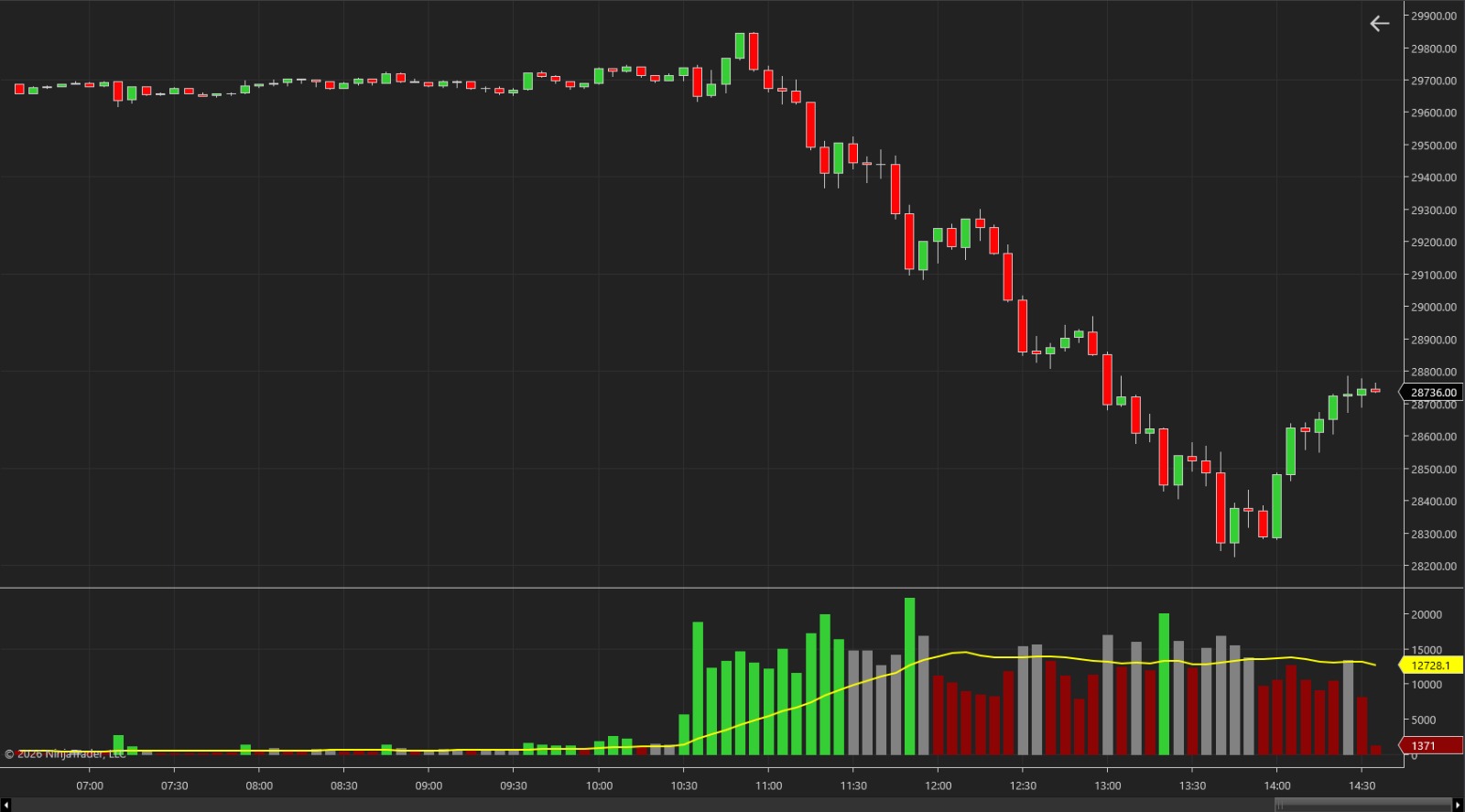
VolumeFilter rodando no NinjaTrader 8: candles do NQ + barras de volume verde/cinza/vermelha + média móvel amarela

Ever traded a move that looked strong and died in your face?

3 colors. 1 glance. Direct decision.

VolumeFilter compares each candle against the 20-period volume average and paints the bar one solid color, you don't calculate anything.

GREEN

volume ≥ 1.5x average

Real aggression. Institutional buyer (or seller) actually pushing price. This is the candle that confirms entry.

GRAY

volume within normal range

Market breathing. Confirms nothing, could be absorption, could be indecision. Signal to wait for the next.

RED

volume below average

No fuel behind the move. End of a trend, it's exhaustion. On a breakout, it's fake, won't go far.

Default parameters: Period 20 · HighThreshold 1.5x. Adjustable in the indicator settings.

VolumeFilter isn't just color. It's decision.

The 5 patterns that show up on the chart every day and what to do in each. No fluff, no theory. Straight to the point.

01
BREAKOUT

Breakout confirmation

Every level breakout (resistance, support, IBH, IBL, PDH, PDL, range) needs at least one green bar on the break candle. Without that, it's false until proven otherwise. A candle that breaks gray or red = stops being hit, not institutional conviction.

When to useOn every important level breakout. Don't trade the break without green confirmation.
CautionDon't enter with a gray bar hoping "the next one will confirm". The signal needs volume ON the break candle.
02
EXHAUSTION

Trend exhaustion

Every trend has a cycle: start (greens in a row), middle (gray mixed), end (predominantly red). The exhaustion signal is price continuing in the direction but volume turning red consistently, the classic price-volume divergence.

When to useIn a winning trade, deciding whether to take profit or hold. Useful in rallies without pullback.
Caution1–2 isolated reds is not exhaustion. Requires consistent pattern: 3+ in a row or 4 of the last 6.
03
CLIMAX

Climax volume

A green bar absurdly above the average (3x, 4x+) after a long directional sequence often marks the turning point, not the start. Counter-intuitive: instinct says "there's strength, it'll go far", but it's the last buyer entering (up) or last seller capitulating (down).

When to useIn stretched moves (5+ directional candles) and PDH/PDL tests. Take partial profit before reversal.
CautionClimax is not a counter-trend entry by itself. The reverse trade needs more confirmation.
04
ABSORPTION

Institutional absorption

The most subtle and valuable pattern: green bar on VolumeFilter but small candle in range (doji, pin bar, short body). Lots of volume traded, price standing still = someone large absorbing liquidity from the other side. Sign of strong reversal in the next candles.

When to useOn important level tests when price gets stuck with long wicks and small bodies. R/R is usually 3:1 or better.
CautionDon't confuse with low liquidity (gray/red + small candle = market sleeping). Absorption requires a GREEN bar.
05
DISCIPLINE

Dead day

The hardest pattern: requires doing nothing. Last 30–60 bars overwhelmingly gray/red + greens that don't sustain = dead day. On that day, any trade gets stopped by noise. The trade you didn't take is a winning trade.

When to useEvery morning before trading. Last 30 bars predominantly gray+red = low expectancy.
CautionDon't force a trade to "make up for" yesterday. That thinking burns beginner accounts.

Start with default. Adjust later.

Trade an entire week with default parameters before changing. Only adjust based on your asset and your time, not on a hunch.

Style Timeframe Period Threshold
Scalper1 min141.3x
Day trader5 min201.5x
Day trader15 min201.5x
Intraday swing1 hora141.5x
Daily swing1 dia101.8x

Threshold is the multiplier of the average. 1.5x means "green bar when volume is 1.5× or more above the average of the last N periods".

Stop guessing. Start reading.

Avoid fake breakouts

Breakout without a green bar is a trap. You see it before clicking Buy.

Confirm entries with aggression

Only enter when the trigger candle prints green volume. Brutal filter against impulse entries.

Spot exhaustion before the market does

When volume turns red at the end of a trend, you know the move is losing fuel.

Filter sideways days without trading

Multiple gray and red bars in a row = dead day. Close the chart and save your edge.

Stop trading against the flow

Green volume on the opposite side = institutional against you. The indicator warns before the loss.

Instant read

No need to scan 3 panels. The colors do the work. Mobile-friendly if you trade from your phone.

17+
Partner trading firms
$821M+
Paid to traders
210K+
Awards 2026 ratings
8
Languages supported

What you get now, free.

  • VolumeFilter, NinjaTrader 8 indicator (.zip ready to import)
  • Complete guide here on the site, 5 trading patterns + settings by style + step-by-step install
  • Early access to the VIP Program, get notified first when PRO indicators launch
Valid until 12/31/2026 · After that, the indicator stays installed but shows a renewal notice.
No aggressive lock. No auto-billing. No card.

Clear your doubts before downloading.

Is it hard to install?
No. Download the .zip, open NinjaTrader and go to Tools → Import → NinjaScript Add-On. Select the file. Done. 2 clicks. It comes pre-compiled and ready to add to a chart. This page has the complete step-by-step and, if it gets stuck, there's a manual fallback (F11 → F5) below.
I already have native NinjaTrader volume. Why another?
Native shows absolute quantity. VolumeFilter shows relative strength, compared to the 20-candle moving average. The difference between "there's volume" and "there's volume above normal for this moment". To confirm real aggression, only the second matters.
A free indicator must be bad, right?
It's a strategic sample. We're launching a line of PRO indicators for the Markets Coupons VIP program. VolumeFilter is the foot-in-the-door, fully functional, no crippled version. Whoever likes it will want the rest.
Are you going to spam my email?
You get 1 confirmation email, the download link, then only new indicators and exclusive coupons, max 1 email per week. 1-click unsubscribe. Always.
I have NinjaTrader free version (Sim). Will it work?
Yes. VolumeFilter runs on any NinjaTrader 8, including the Sim version. No paid license required.
What assets does it work on?
Any instrument with real volume: NQ, ES, CL, GC, mini-index (WIN/WDO), forex, stocks, crypto. Wherever there's volume, the filter works.
Can I use it at a trading firm?
Yes. Custom indicators are allowed at all trading firms that accept NinjaTrader (Apex, Bulenox, Earn2Trade, TradeDay, FundedNext via NT, etc).
Will it work after 12/31/2026?
The indicator stays installed but shows a renewal notice in the panel. The v2 version (paid, new features) will be released before expiry, and whoever grabbed v1 free has priority.

Real reviews from people who installed it.

No paid reviews, no "influencer-bought reviews", just traders who got the indicator and wanted to speak up.

★★★★★
0.0 avg · 0 reviews

Downloaded already? Leave your review.

Your rating

2 clicks. 90 seconds. Up and running.

After confirming your email, you get the .zip link + access to this complete guide here on the site. No hassle.

  1. 01

    Download the .zip

    Download link arrives in your email as soon as you confirm signup. Save it anywhere, no need to extract, NinjaTrader imports the zip directly.

  2. 02

    Open NinjaTrader 8 and go to the Tools menu

    In NinjaTrader's top menu, click Tools → Import → NinjaScript Add-On. A window will open for you to select the file.

  3. 03

    Select the downloaded .zip

    Point to the file you downloaded. NinjaTrader imports, compiles and installs automatically. If "Restart required" pops up, close and reopen NT. <strong>Didn't work?</strong> See the fallback below.

  4. 04

    Add it to the chart

    Open any chart, click Indicators (shortcut: Ctrl+I), search for VolumeFilter, click Add. Done, colored bars in the lower pane.

  5. 05

    Save the workspace

    Ctrl+S in the Control Center. Next time you open NinjaTrader, VolumeFilter will already be on the chart the way you left it.

⚠ FALLBACK Fallback (if Import refuses)

Extract the .zip, copy VolumeFilter.cs to Documents/NinjaTrader 8/bin/Custom/Indicators/, open NinjaScript Editor (F11) and hit F5 to compile. Works 100% of the time.

// IMPORTANT

This page has everything, installation, the 3-color concept, the 5 real-use patterns and the settings table by style. Bookmark it, read once, come back when you need.

Stop trading in the dark. Start seeing what really matters.

Just enter your best email below and you'll receive, right away, the download link. The complete guide is already here on the site.

No card · No catch · 1-click unsubscribe